2018-02 Release Notes
Iteration: 2018-02
May 11 2018
What’s New?
| 2093 | Added Transferred status for enrollments. |
| 1936 | Added a feature to define Forbidden LDC rules for different utilities. |
| 1996 | New options to setup Agent and Master Codes. |
| 1925 | Now it’s possible to search enrollments by all the LDCs of its history. |
| 1924 | Added new filters to the Zip Code Manager. |
Fixes and Improvements
| ¯\_(ツ)_/¯ | Fixed an issue where it wasn’t possible to change the drop queue. |
| ¯\_(ツ)_/¯ | Fixed an issue that duplicated Legacy Enrollments |
| 2103 | Fixed an issue where some variables weren’t replaced in Autoresponders. |
| 2119 | Fixed an issue where drops where being imported several times |
| 1964 | Improved notification warning message when editing an enrollment. |
| 1848 | Added a validation to Quick Enrollments to exclude plans of deactivated utilities. |
| 2018 | Added a length validation for the Name and Subject fields for the Autoresponder edit screen. |
| 2016 | Fixed an issue where failed retrying large amount of legacy imports. |
| 2047 | Added a validation to prevent adding the same rule and flow for the same utility in the Rule Manager. |
| 2089 | Improved message error when importing a legacy account with a forbidden email address. |
| 2086 | Fixed an issue where the state was being shown as a number. |
| 2083 | Readded the “Code not found click to add” button in Drops Management, which was removed after updating the interface to the 2.0 UI. |
| 2101 | Added the renewal alert message to customer support. Until now it was shown only in My Account. |
| 2123 | Fixed an issue that prevented from exporting the Consolidated View of drops. |
| 2082 | Added a validation when resending emails to prevent duplicates. |
| 2100 | Now the “Move to Queue after Save” checkbox in “Change Call Disposition” is selected by default. |
| 2073 | Now the rate in Enrollment Details is shown with all the decimals. |
| 2120 | Now the drops that are imported in the ETF Invoice, with an ETF Calculation of zero are sent automatically to Drops Archive. |
| 1922 | Added a couple on new log messages for the “Get PPU Renewals Pending” process. |
| 1724 | Now the enrollments excel export has the monthly fee column. |
| 2029 | Added a Role for “Show All Rates” button in Quick enrollments. |
| 2021 | Improved validation to prevent spaces in LDC fields. |
| 2115 | Improved syncing of enrollment dates with ESG. |
Features & Fixes Details
Added Transferred status for enrollments
The new Transferred status is used for the accounts that have been sent or sold to another business and shouldn’t be considered any longer by the system.
The system ignores the accounts in this status for most of its automatic operations, but still let the user to work manually and update them without restriction. The only case where the system still considers these accounts in it’s automatic operations is during the Drops Imports, where it import the drops but doesn’t create any notification / document and does not change the corresponding account status to Dropped.
With the new Transferred status the system now logs the manual changes to the Transferred status and has the Manual Change Status to TRANSFERRED autoresponder action to send the needed documents to the customer when this operation is performed.
Added a feature to define Forbidden LDC rules for different utilities
In a similar manner to the way forbidden emails are indicated, it is possible to define a set of rules for forbidden LDCs by utility. This rules are validated in the Rates Wizard and Quick Enrollments.
To do this, a new Forbidden LDC Numbers page has been added to the Types Setup:
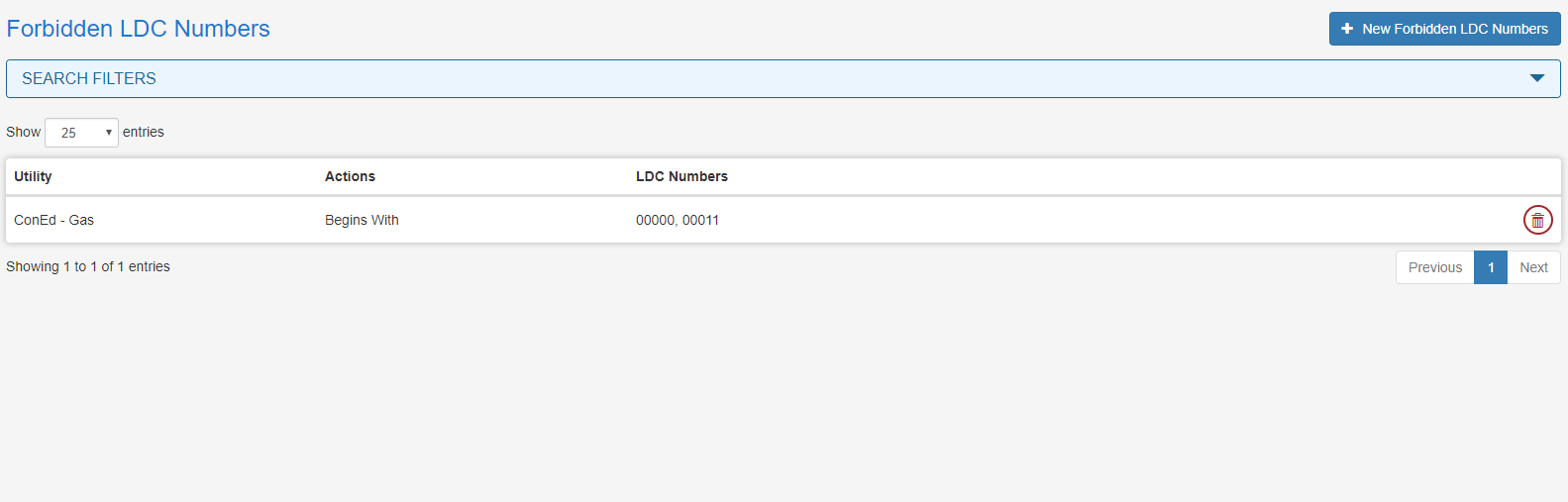
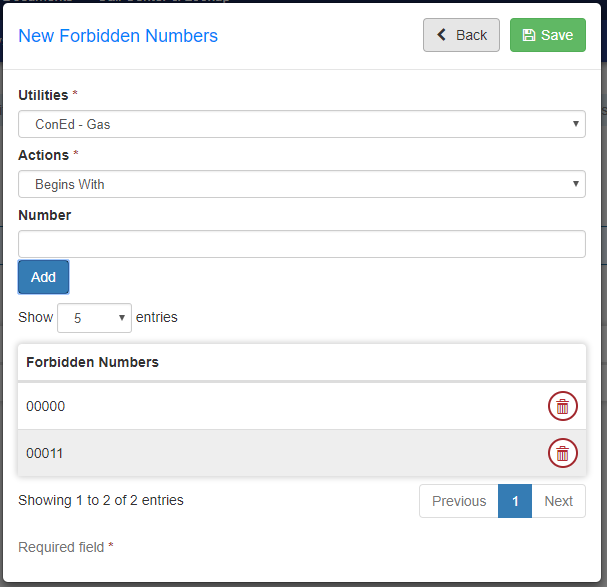
When creating a new rule the user must select the utility associated to it. Then, there are three options to validate the rule:
-
Begins With: The LDC cannot begin with the defined character strings.
-
Ends With: The LDC cannot end with the defined character strings.
-
Contains: The LDC cannot contain any of the character strings.
Each rule can contain as many strings of characters as needed. But all this strings are compared as they are and therefore wildcards can not be used.
If the utility uses a dash format, the dash must be entered for the rule.
New options to setup Agent and Master Codes
Up until now there were two configurations available in system setup:

Now these two configurations are split in four values, two for web enrollments and two for quick enrollments. This will allow users to differentiate between users who use quick enrollments vs enrollments initiated in the website:

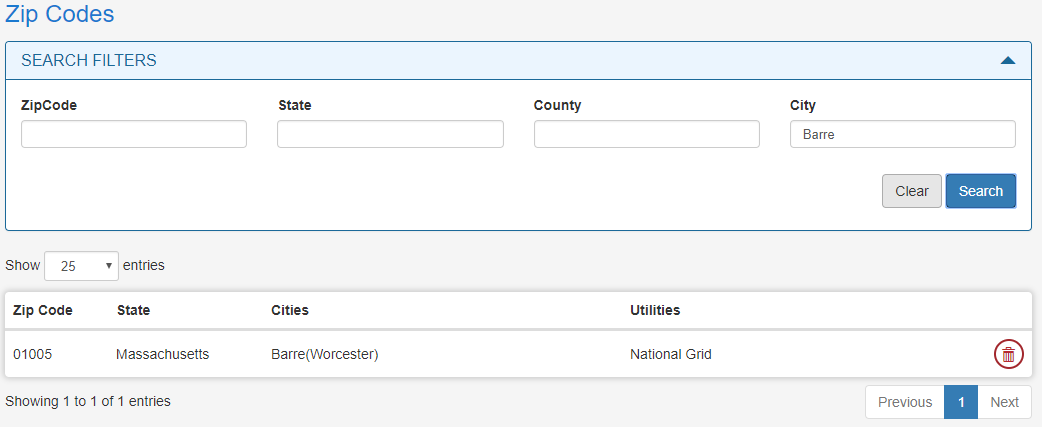
Added new filters to the Zip Code Manager
The Zipcode Manager now allows to filter by County and City.
Improved notification warning message when editing an enrollment
We improved the behavior of the warning shown when editing an enrollment:
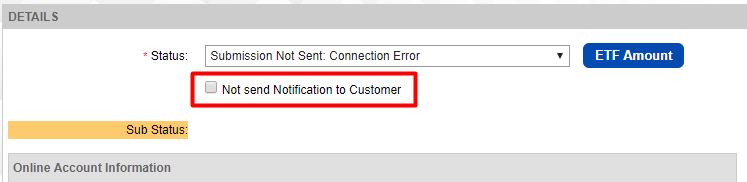
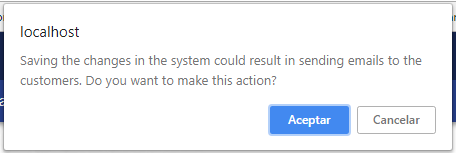 Until now, everytime the user edited an enrollment, this message would always pop up when saving the changes. Now the conditions to show this message are:
-
There must be a change in the enrollment status;
-
The Not send Notification to Customer must be unchecked.
Added a Role for “Show All Rates” button in Quick enrollments
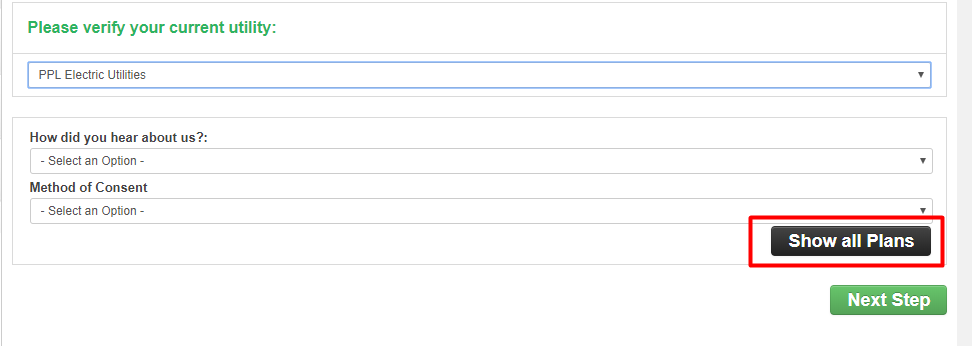
We changed the way the system handles the “Show All Rates” permission. The user no longer needs to be associated to the Administrator role group. Instead, it’s enough to be associated to ANY role group that has the role Quick_Enrollment_All_Rates_Button associated. This gives users the ability to see all rates while restricting access to other parts of the system associated with the administrator role group.
Improved syncing of enrollment dates with ESG
A couple of weeks ago we were informed that there were enrollments that had wrong dates when compared to the ESG data. We found that were several cases where the data we received was ambiguous and the system was updating with incorrect dates when syncing with the datamart extract. This issue was difficult to solve because even though we could see that there was incorrect data, there was no way for us to replicate the issue. After several weeks of searching and tweaking all those strange cases it finally seems that the syncing is working as intended once again!!